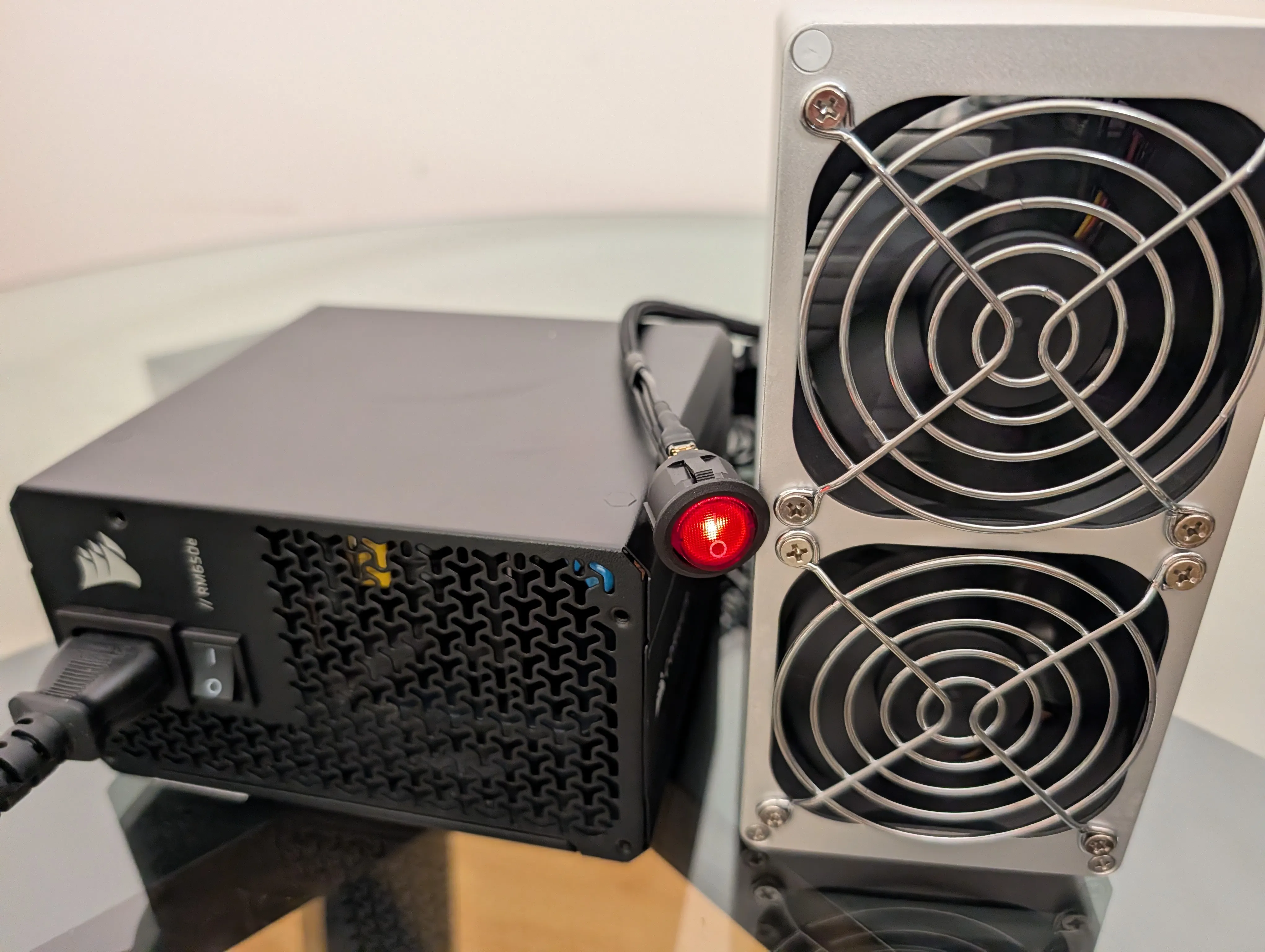
Running. The red rocker is the whole control panel, and getting to this photo is most of this post.
Our last post covered getting an Umbrel node onto BLAKE2b mainnet: Knots, the wallet, and the DATUM gateway. This one is the other half, the physical half. A used Goldshell SC Box arrived from eBay as a sealed unit with no power supply, and one evening later it was solo mining against our own node at its rated hashrate with zero rejects. Neither of us had ever wired mining hardware before.
The reason this box exists in a Bitcoin post at all: the SC Box was built to mine Sia-header BLAKE2b, which is exactly the algorithm Bitcoin’s RDTS fork moved to. The box neither knows nor cares which chain is on the other end of its stratum connection. Ours proved itself on testnet4 first and now hashes mainnet through the identical setup; nothing below changes between the two.
The shopping list
- Goldshell SC Box. Ours was $250 shipped, used, with an “SCPrime edition” sticker on it. The sticker turned out to be just a sticker: the firmware identifies as a plain Goldshell-SCBox and mines BLAKE2b (SC) like any other. It ships with no PSU and, despite the antenna on the back, ours only ever ran wired.
- A desktop ATX power supply. We used a Corsair RM650e, 650 W, fully modular. The spec sheet puts the box around 200 W, so 650 is generous headroom.
- A 24-pin ATX jumper with a switch. Ours is a CRJ with a red rocker. The reason you need this odd little part: an ATX power supply stays off until a motherboard tells it to start, and there is no motherboard in this build. The jumper is the fake motherboard, and its rocker becomes the rig’s power button.
- One Ethernet cable. The box must sit on the same network segment as your node, because the only thing it ever talks to is your DATUM gateway.
Part 1: Power, and the two connector traps
The RM650e ships with seven cables, and the first beginner question of the night was which of them you actually need.
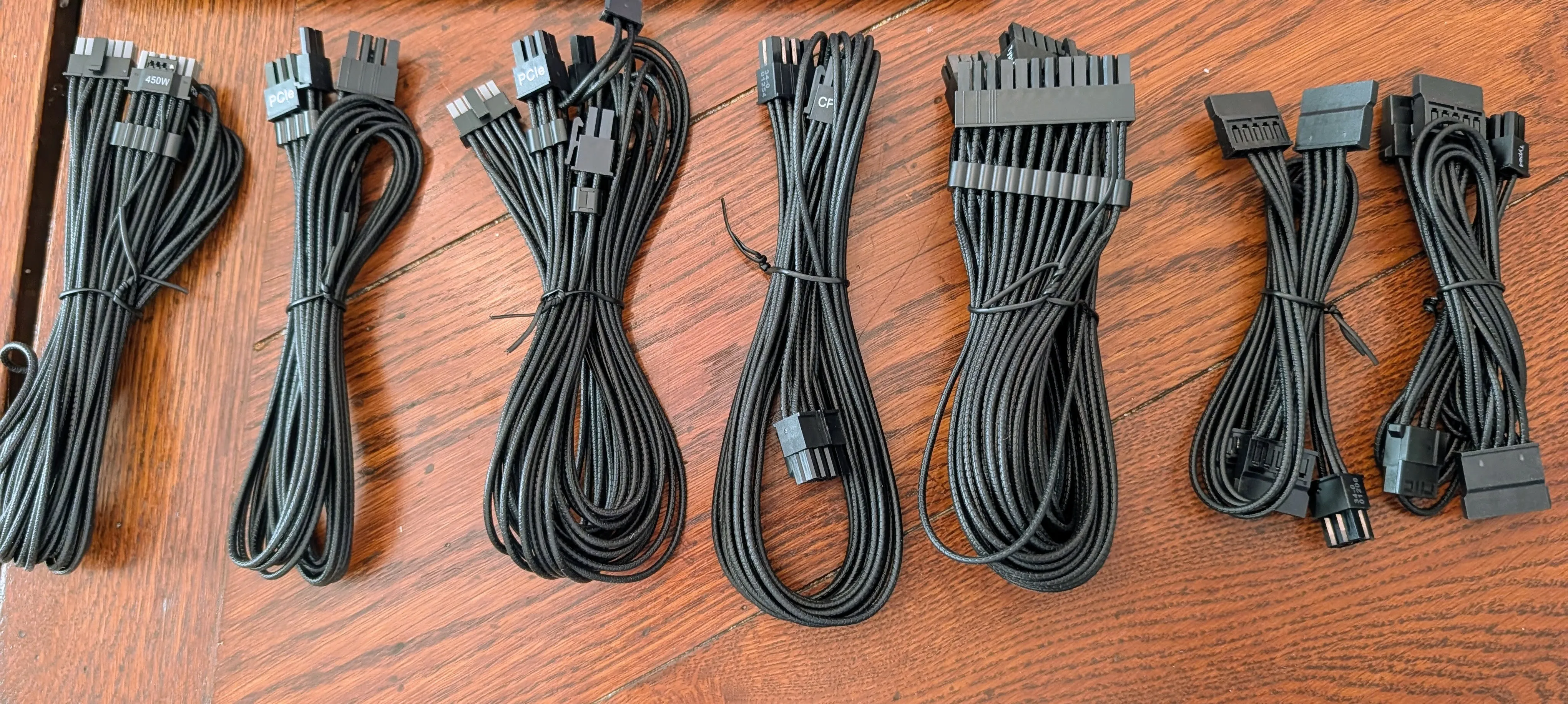
The “which one do I need” photo. Answer: two of the seven.
You need the 24-pin motherboard cable and one PCIe cable. The trap is that the CPU/EPS 8-pin cable looks nearly identical to the PCIe one, and forcing the wrong cable into a miner is the classic way to kill it. The tell is printed on the connectors: PCIe is a 6+2 with a detachable two-pin tail and says “PCIe” on the PSU end; the CPU cable says “CPU”. If it says CPU, put it back.
The back of the box settles how much of the PCIe cable you use: there is exactly one 6-pin socket. The 6-pin part clicks in and the +2 tail hangs loose. That is correct, not a mistake.
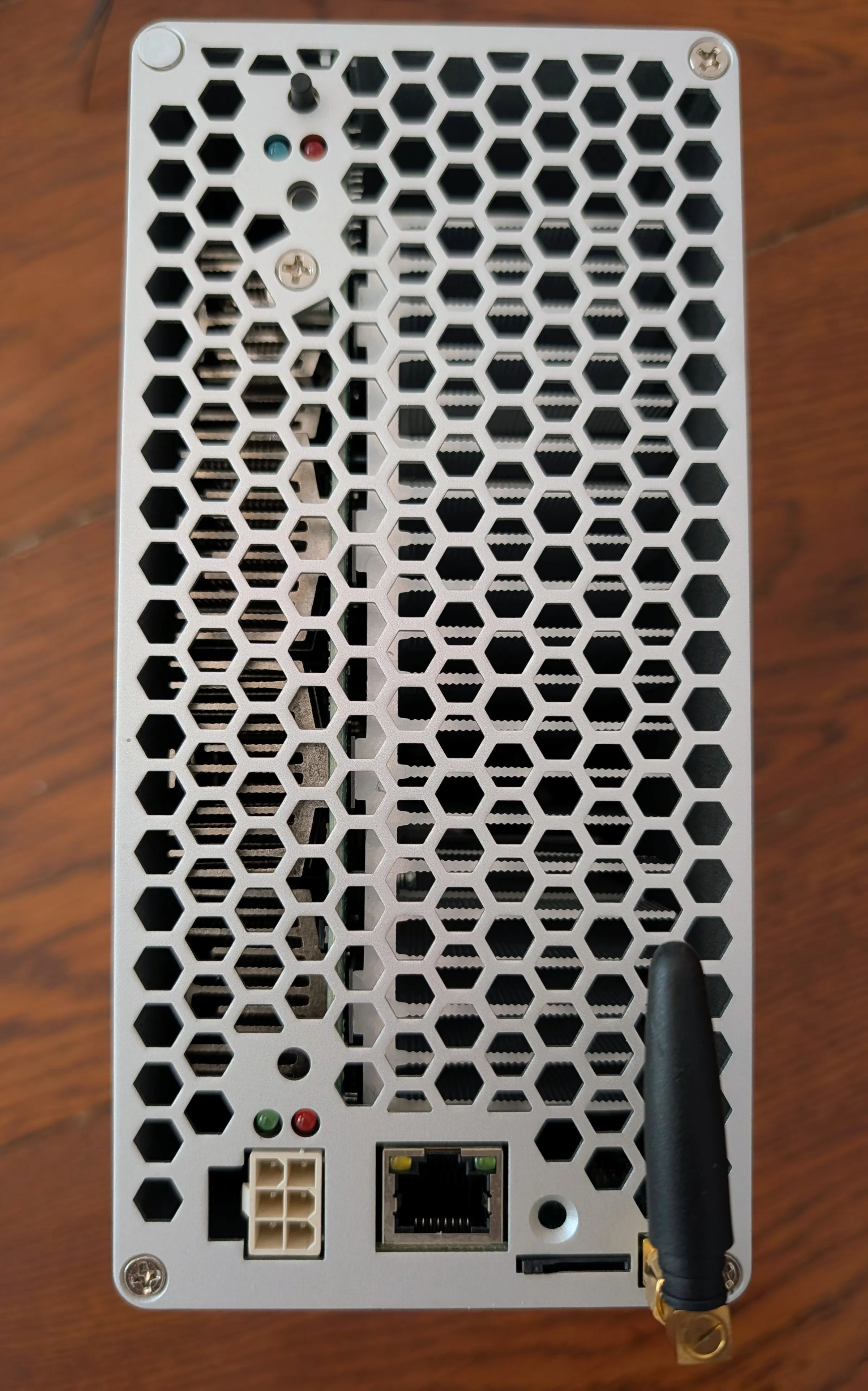
One 6-pin socket. The antenna is decorative for our purposes; the Ethernet port is not.
The second trap is the jumper. Instinct says a “PSU jumper” plugs into the PSU. It does not fit there, and that is by design: Corsair’s panel-side pinout is proprietary, and the panel even warns “genuine Type 4 cables only”. The jumper plugs into the far end of the PSU’s own 24-pin cable, the end that would normally meet a motherboard.
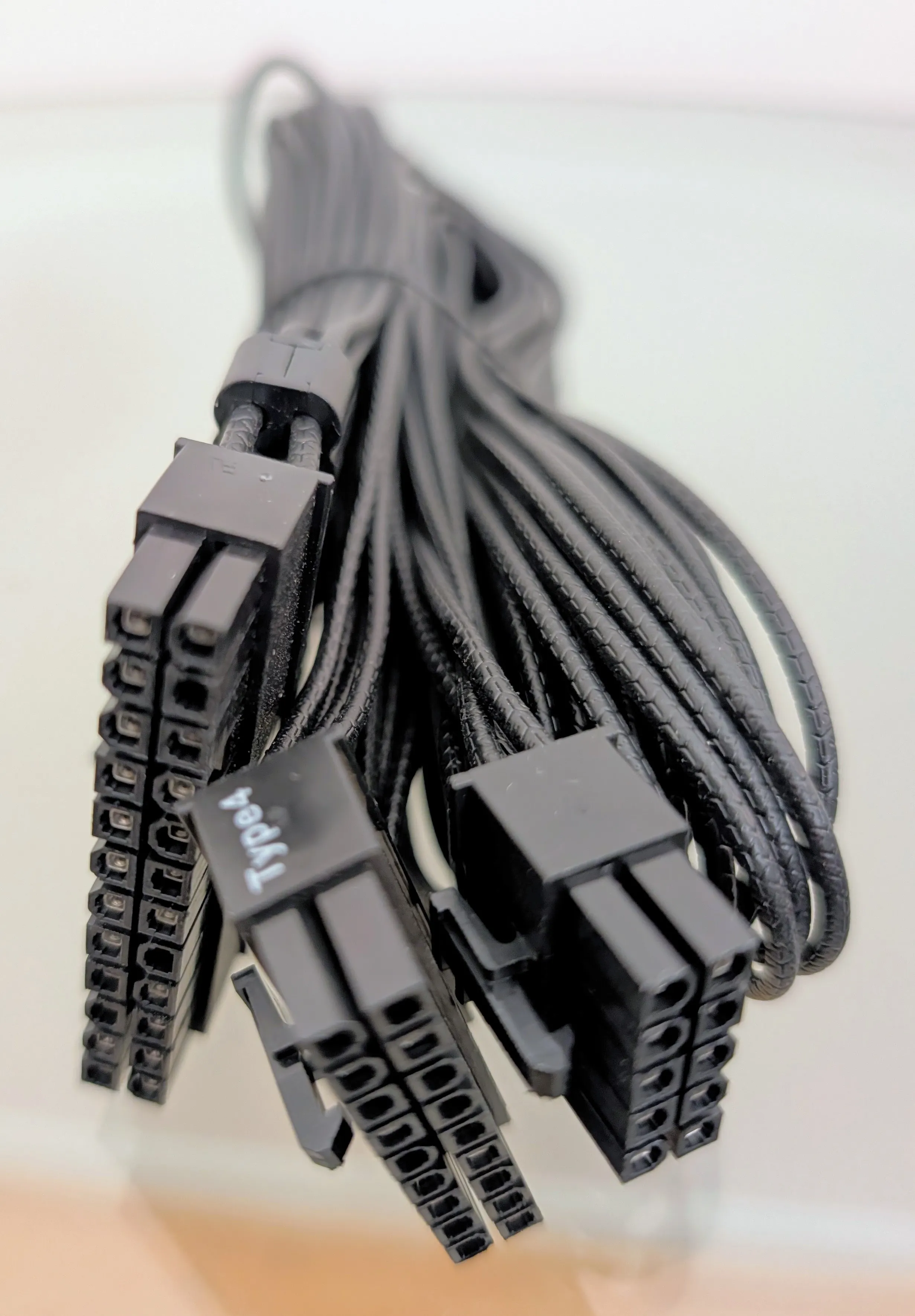
The 24-pin cable. The split end goes to the PSU’s MOTHERBOARD socket; the single-block end takes the jumper.
So the full chain is: wall → PSU → 24-pin cable (into the socket labeled MOTHERBOARD) → jumper on the cable’s far end, plus the PCIe cable from either CPU/PCIe socket to the box, plus Ethernet to your router.
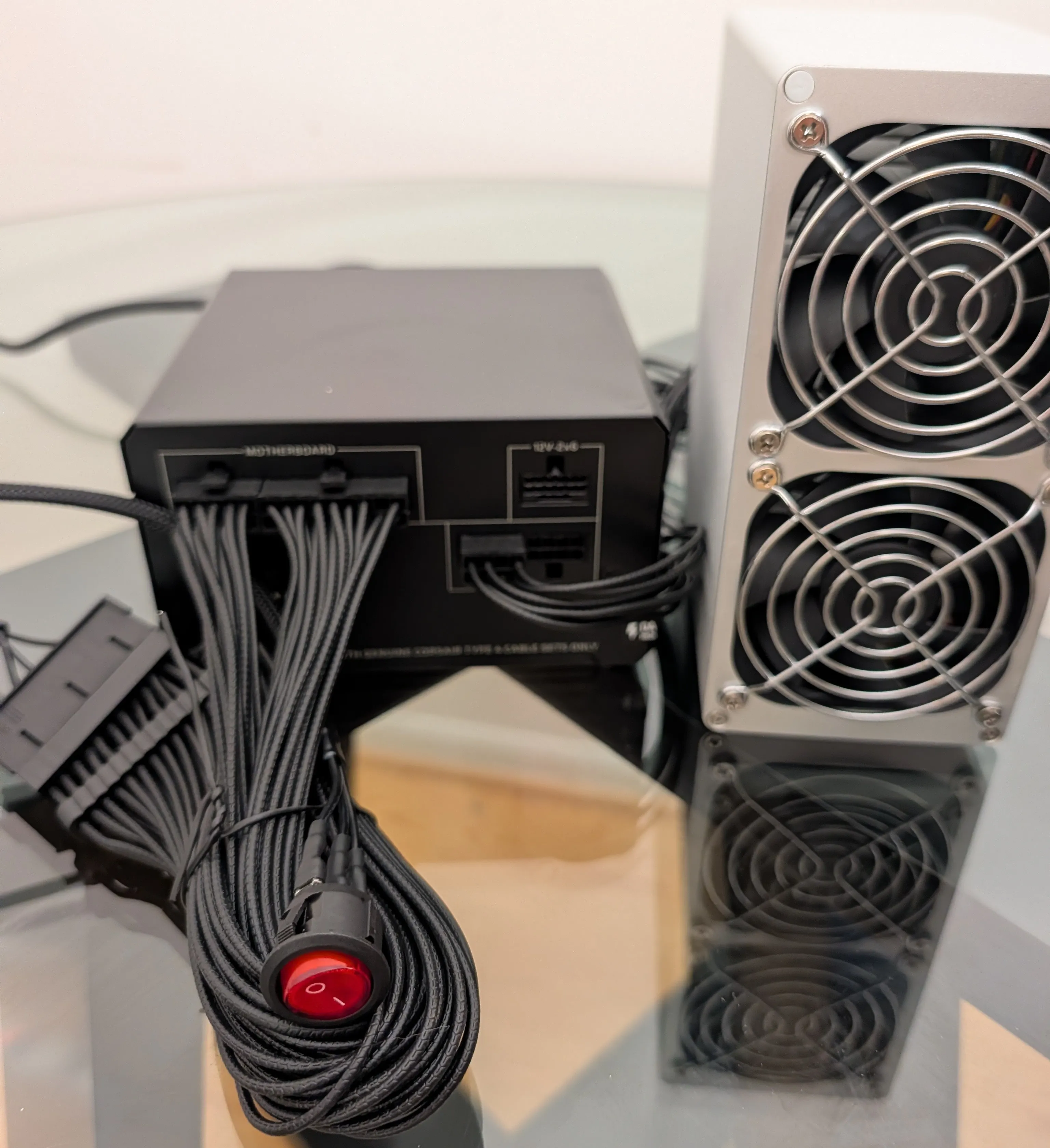
The whole wiring diagram in one photo.
Flip the PSU’s own switch, then the red rocker. The fans spin immediately. There is no power button on the box and no further ceremony.
Part 2: Find the box, and the surprise inside it
Goldshell’s official discovery tool is find.goldshell.com, and for us it said “Miner Not Found”. It appears to match miners by public IP, so a VPN or a private browser window breaks it; ours was behind both. Skip it: open your router’s client list, or scan the LAN. Ours showed up as a host named qsdk serving a web page titled “cloud-box”. That unlabeled thing is the miner.
Then the surprise. Nineteen minutes after we plugged it in, the box was already hashing at 959 GH/s. It was mining Siacoin for the previous owner, whose f2pool account was still configured. A used miner mines for its old owner until you change the pool. For twenty minutes ours did it from our living room.
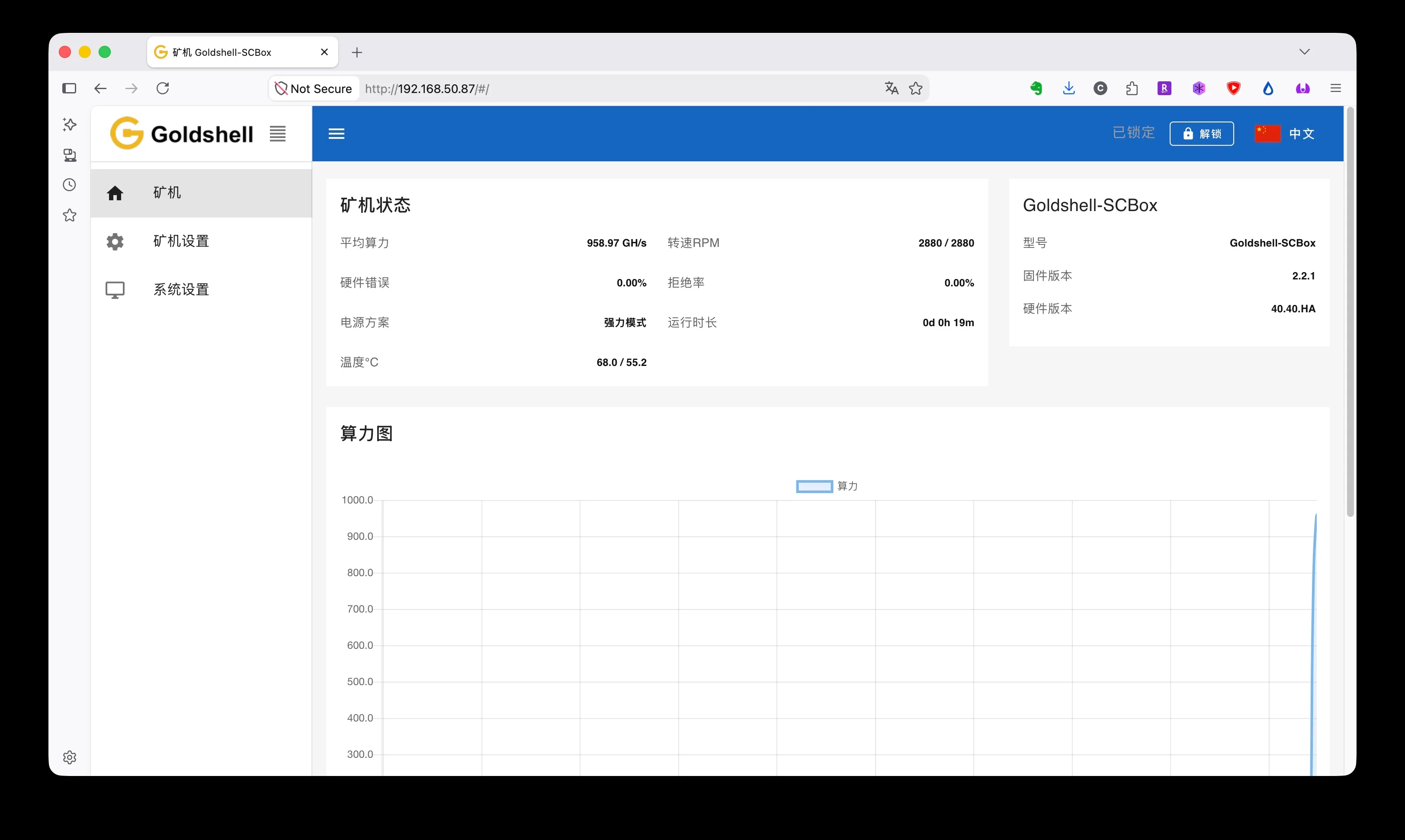
First load: Chinese by default (the language switch is top right), and already mining for a stranger.
Part 3: Point it at your node
The web UI wants an unlock password before it lets you touch settings; ours still had Goldshell’s factory default, 123456789. Change it while you are in there.
In Miner settings, delete the previous owner’s pool entry, then add your own:
Pool:     stratum+tcp://<your-umbrel-ip>:23339
Worker:   scbox1 (anything works)
Password: x
Three small traps here:
- Port 23339, not 23334. The SHA-256d DATUM app that predates the fork listens on 23334, and most older video guides show that number. The BLAKE2b DATUM gateway on Umbrel listens on 23339; Connor’s Lab reports that the Start9 mainnet package uses the standard 23334, so the number belongs to the packaging, not the chain. We watched someone try 23334 on Umbrel and conclude the setup was broken.
- There is no Apply button for pools. The ADD dialog saves immediately; the Apply buttons on that page belong to other sections. A green key icon next to the pool means connected.
- The Algorithm section is invisible until you unlock. Once unlocked it appears, reading blake2b(SC). Leave it alone; there is nothing to pick.
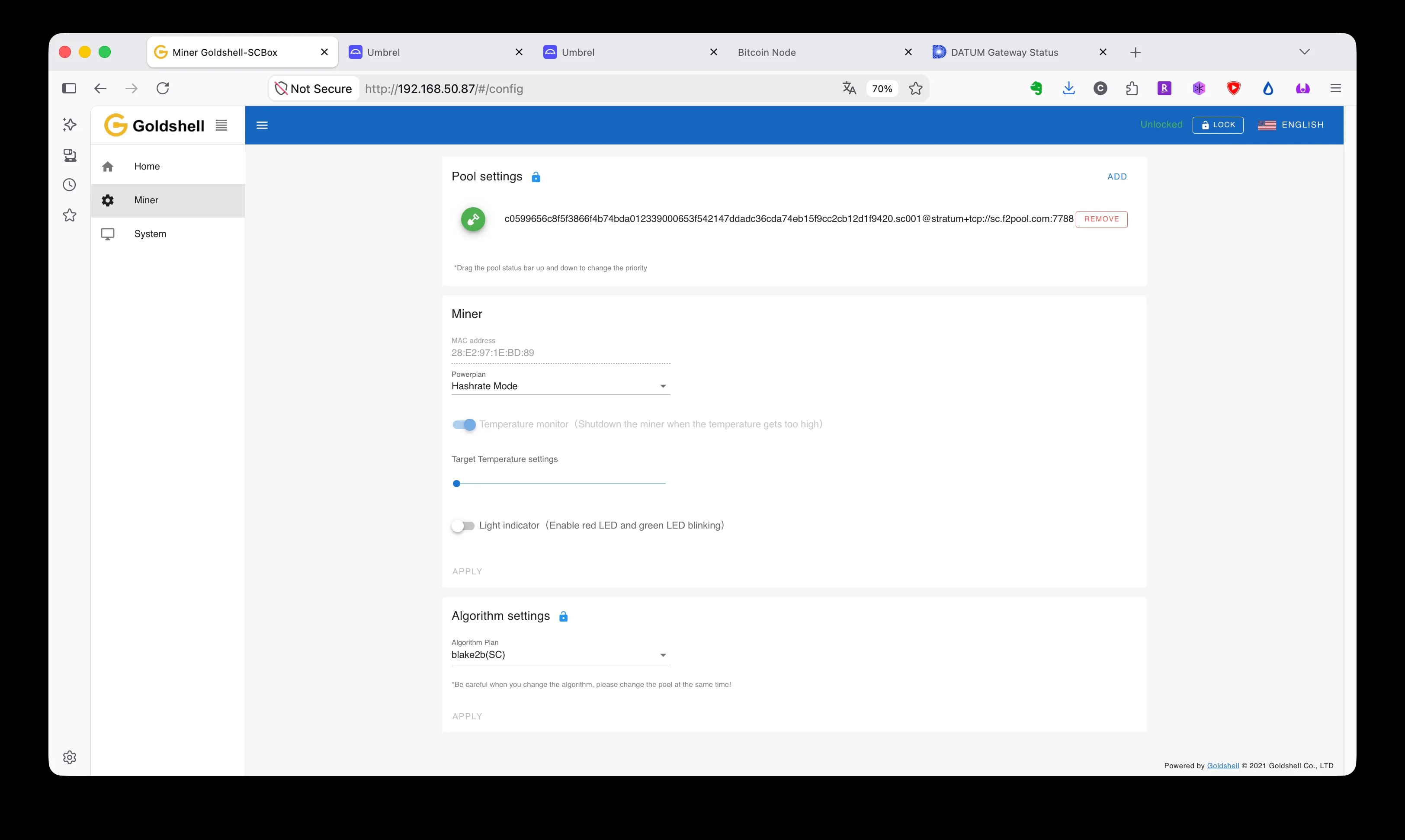
The only three fields the box ever needs from you.
The <your-umbrel-ip> half of that address is the node side, and it is the whole previous post: Bitcoin Knots and the DATUM (blake2b) gateway on an Umbrel, payout address, coinbase tags, solo mode. If you have not set that up yet, start there and come back to this step.
What success looks like
Check both ends, and believe them only when they agree. The box’s own UI happily showed 0% rejects while it was mining for a stranger, so one screen alone proves little. Success is the DATUM gateway’s status page showing local shares accepted with your tags on the job, and the box’s home page showing the same accepted count.
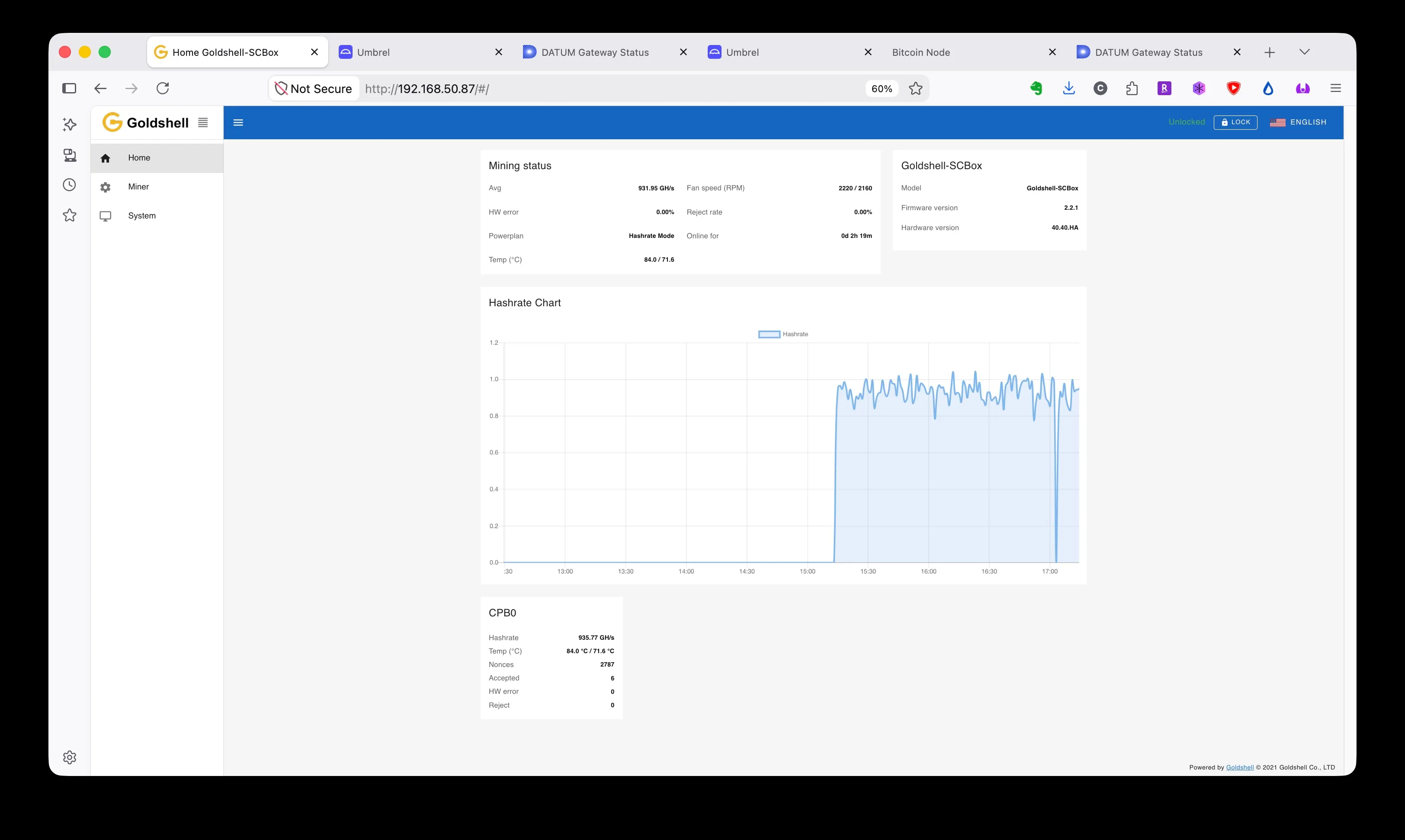
Both ends agreed: 932 GH/s average, six accepted, zero rejected. The dip in the chart is the moment it stopped working for the old owner.
From flipping the rocker to this screenshot took us about three hours as complete beginners photographing every step. With the traps above pre-warned, it is closer to an hour, and most of that is the node syncing.
Living with it
A few things the spec sheet does not mention. The box on a coffee table with no airflow climbed from 68 °C to 84 °C over the evening; the firmware’s temperature watchdog is on by default, and a corner with real airflow (or a desk fan) is the actual fix. The label says about 200 W at the wall; we have not metered ours yet. And once everything works, consider blocking the box’s internet access at your router: the firmware is closed and phones home to Goldshell’s discovery service, and the only connection it needs is the LAN path to your gateway. One more report from the field: Connor’s Lab says some Goldshells and Antminers refuse to hash until “Allow hasher time rolling for BLAKE2b jobs” is enabled in the DATUM config. Ours never needed it, but if your box connects and never submits a share, try that box first.
On expectations: during our testnet trial this one box was about a third of a percent of that small network, which averaged out to a shot at a block roughly once a day, and none arrived. Mainnet odds depend on how much BLAKE2b hashrate shows up, a number nobody has this early. So the pass condition is shares accepted at 0% rejects, from your own node. The block is a lottery ticket that runs while you sleep.
One more thing, because this site runs on being checkable: this is the record of one box, one PSU, and one evening in late August 2026. If you run it and something is wrong, unclear, or has drifted out of date, say so, on X or in the Knots Discord, and this post gets fixed and dated. The posts before this one already carry reader corrections; this one can too.