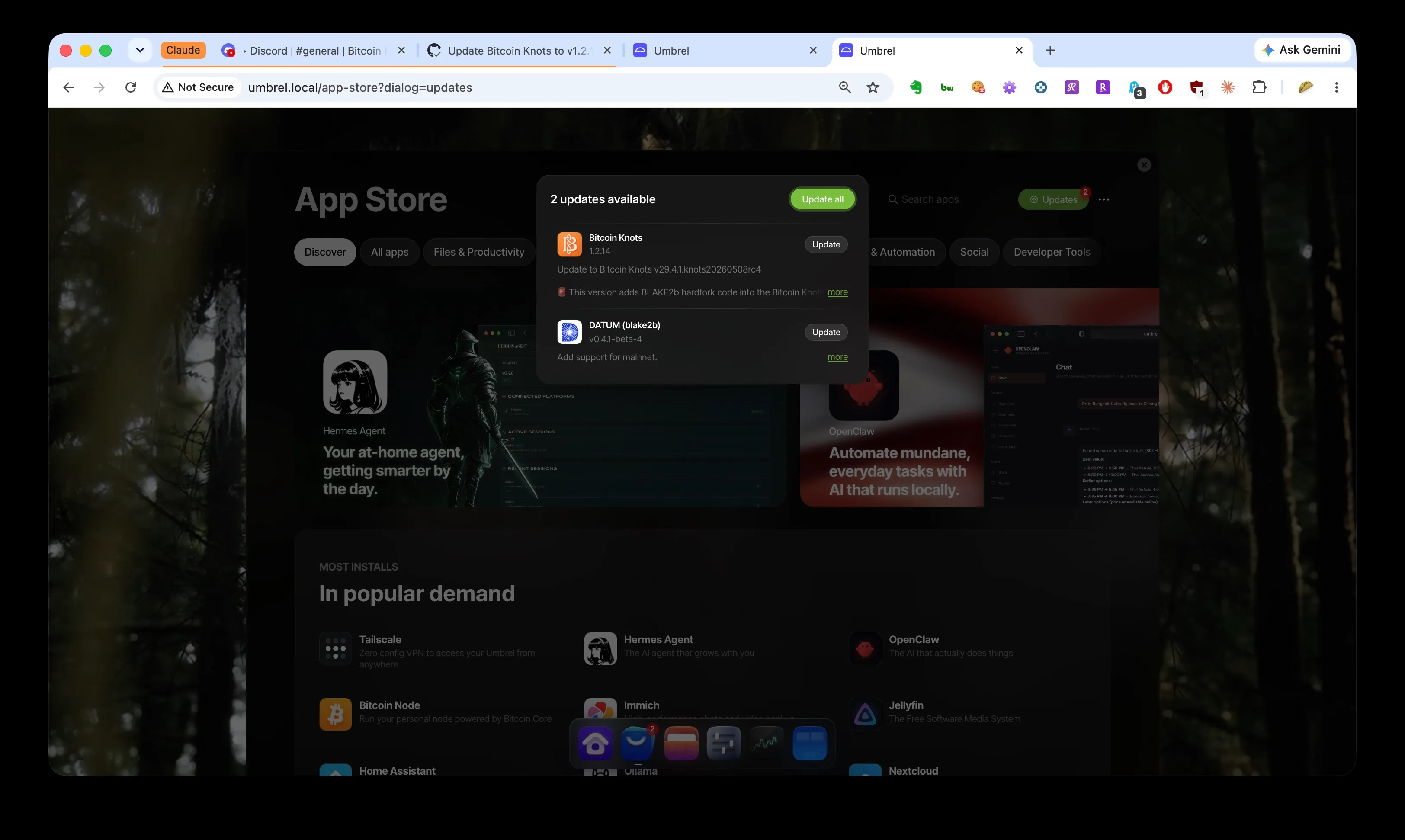
The update that is not supposed to be there yet. Getting it to appear is most of this post.
This afternoon in the Bitcoin Knots Discord, someone asked for “the latest instructions: how to set up my Umbrel with Knots for the hard fork, how to set up a wallet as receive address, how to set the miners up.”
This post is those instructions, in that order, exactly as we ran them on our own node today. By the end of it our Umbrel was validating BLAKE2b mainnet on its own and our Goldshell SC Box was solo mining against it, payout to our own cold wallet. Total hands-on time was about an hour, most of it spent learning the traps you are about to skip.
First, where things actually stand, because the honest framing matters. BLAKE2b went live on mainnet at block 961,640, mined 30 August at 06:14 UTC. Luke Dashjr calls this run a “rehearsal”: the final release is due 1 September, and if anything breaks before then, an rc5 resets the chain back to 961,639 and it starts again. So everything below gets you mining real mainnet blocks that stay real only if the rehearsal holds. Blocks found now pay a real coinbase to your real address; a reset would erase them. Mine accordingly.
Part 1: Get rc4 onto the official Bitcoin Knots app
The build you need is Knots 29.4.1 rc4, which ships as version 1.2.14 of the official Umbrel “Bitcoin Knots” app. The good news: it is the same app you are already running. No reinstall, no chain re-download, no data move.
The catch: as of today, the update is sitting in an unmerged pull request (getumbrel/umbrel-apps #6034). Léo, who maintains the Knots Umbrel app, told us in the Discord there is no timeline: his side is done, Umbrel just has to merge it. Until they do, your App Store will not show the update.
There is a workaround, and Léo posted it himself in the Knots Discord #mining channel. You point your Umbrel’s copy of the app store at his repository and switch to the branch carrying the update:
Open Settings (the sliders icon) > Advanced settings > Terminal > umbrelOS, and run:
cd umbrel/app-stores/getumbrel-umbrel-apps-github-* && git remote add leo https://github.com/Retropex/umbrel-apps.git && git fetch --all && git switch rc4Now the part nobody tells you: this is a race, and you can lose it. Umbrel re-syncs its app store back to its own master branch every few minutes, and that re-sync deletes your switched branch. The command “worked” and produced nothing twice before we understood why.
So set up first, act second:
- Open a second browser tab at
http://umbrel.local/app-store?dialog=updatesand leave it there. - Run the command in the terminal tab.
- The moment it prints
Switched to a new branch 'rc4', jump to the updates tab and reload. Reload again every ten seconds or so if needed. - When Bitcoin Knots 1.2.14 appears, click Update on it immediately.
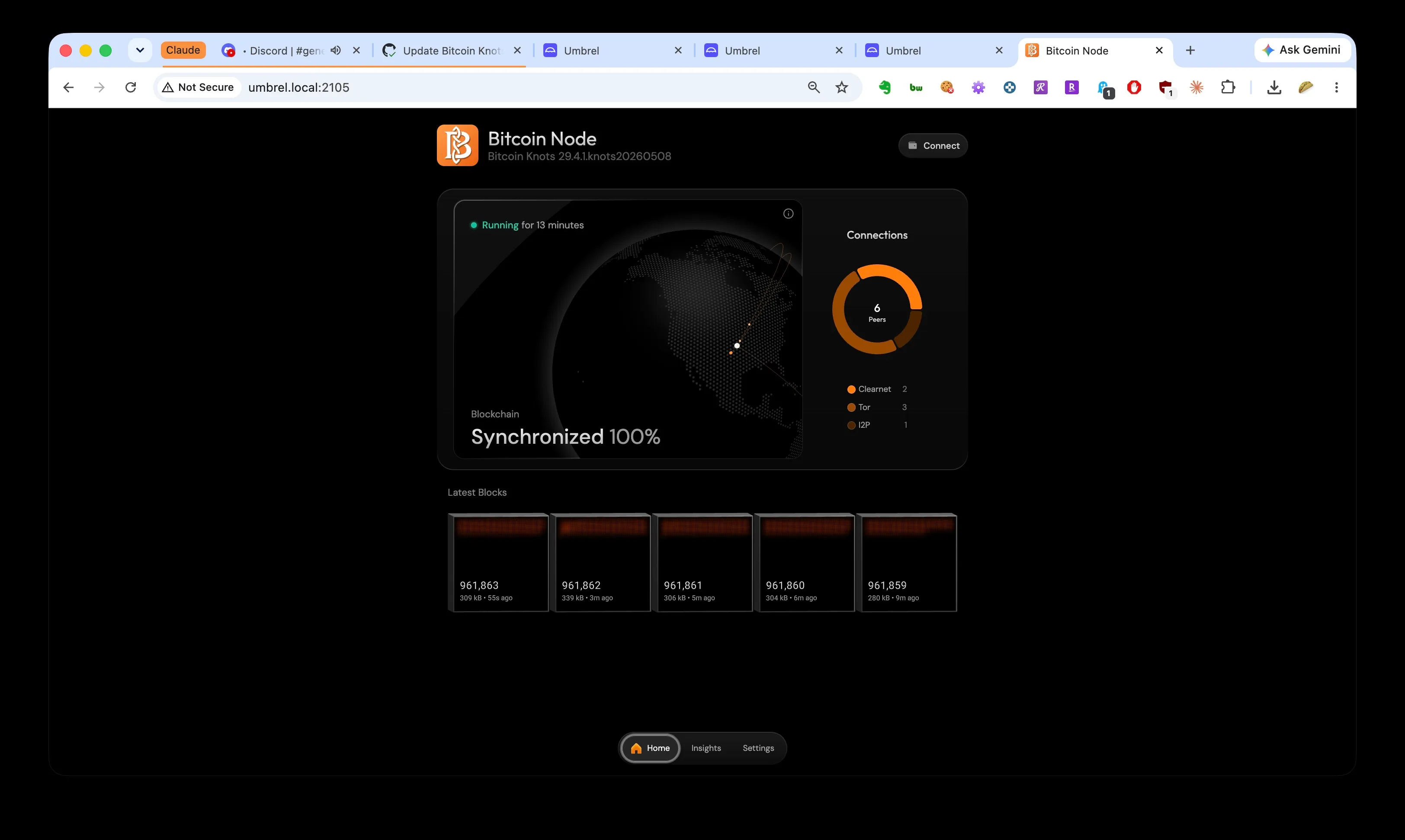
What success looks like about fifteen minutes later.
Two things happen after the update that look like problems and are not:
The app says “stopped unexpectedly.” Expected. rc4 refuses to start without the current headline string, which you set by hand. In the Knots app: Settings > Advanced, find the “Custom bitcoin.conf overrides” box (it is above the error log, scroll up), add this line to whatever is already there, and click Save overrides, not any other save button:
blake2b_headline=8-30 NYPost Deride And ConquerThe node then starts cleanly, finds rc4 peers, and pulls the BLAKE2b chain. Ours went from the last SHA-256d block to the live tip in about a quarter of an hour.
A new Knots “update” appears a few minutes later. Do not click it. That is the same store re-sync offering you the 1.2.13 downgrade, because master still thinks 1.2.13 is current. It sits there looking exactly like a real update until Umbrel actually merges the PR, at which point it resolves itself. Léo warned about this in the same Discord post, and sure enough:
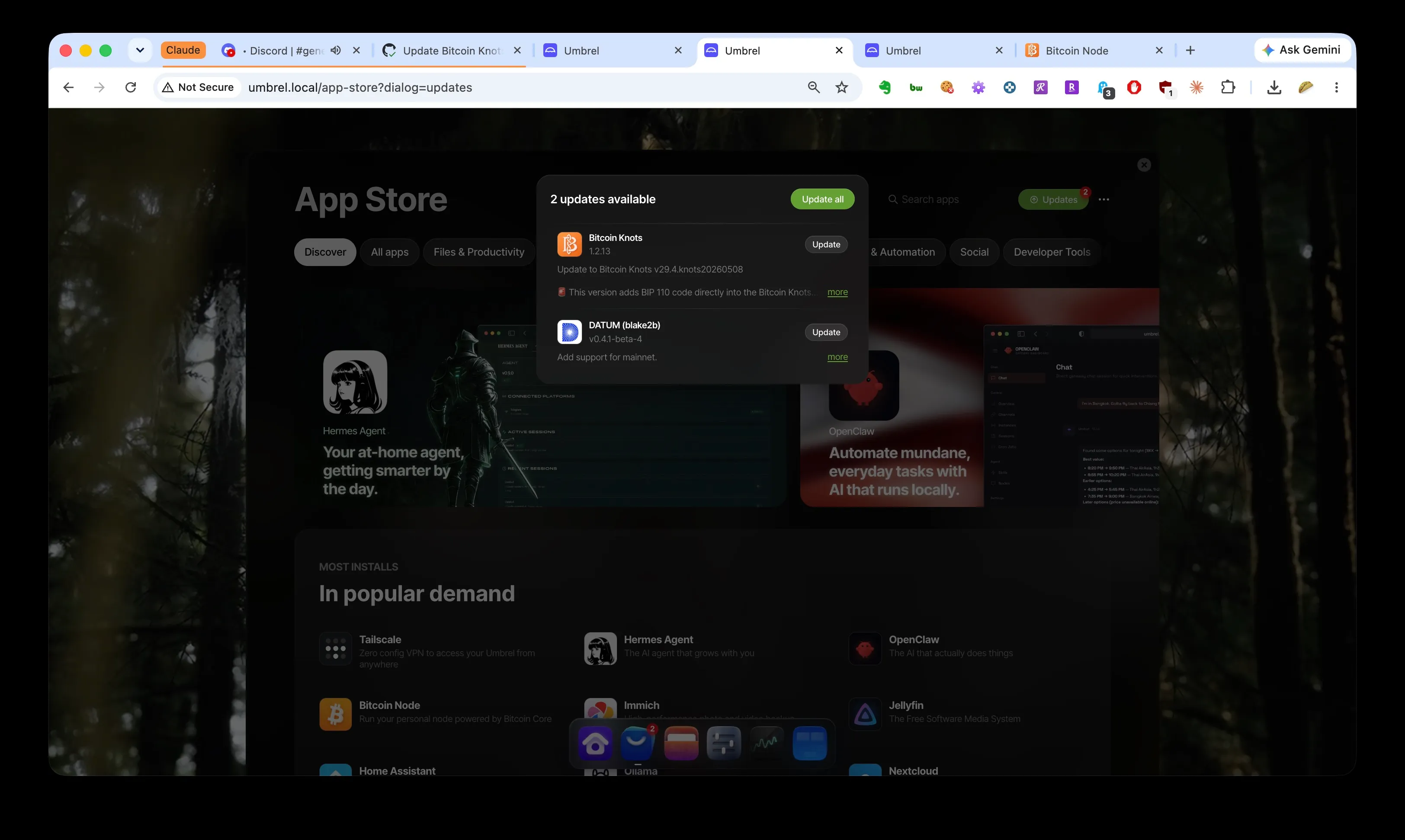
The trap, on schedule. The DATUM update below it is real, and it comes later in this post for a reason.
The trade-off you are accepting with the shortcut: a foreign git remote in your Umbrel’s store checkout, on what is probably your only mainnet node, versus waiting indefinitely for a Sunday merge. Léo’s repository is the same one the pull request itself comes from, so the code is what Umbrel would ship anyway. We took the trade. Decide for yourself.
Part 2: The wallet question
“Should I create a Sparrow wallet? What settings?” The answer is simpler than the question: any wallet whose keys you control and have backed up, hardware preferred, and what you need from it is one Native SegWit receive address, the kind that starts with bc1q.
We used a hardware wallet that had been sitting in a drawer. Plugged it in, updated its firmware, added a Bitcoin account (the wallet’s software created it as Native SegWit by default), clicked Receive, and verified the address on the device’s own screen before using it. That last step is the entire point of hardware: the address your computer shows you is only trustworthy after the device itself agrees.
Things that do not matter today: which vendor, fancy settings, whether the wallet has ever held coins. Things that matter: the seed phrase is backed up somewhere you trust, the address is yours, and it is bc1q.... A mining payout address is not a secret (every block you find publishes it), but it does need to be spendable by you and nobody else.
If a block reward lands there and a chain reset later erases it, the address is unaffected. You can also swap it any time; it is one config field.
Part 3: DATUM, and the order of operations
The miner-facing half is the DATUM (blake2b) gateway app from Léo’s community store (Retropex), updated today to v0.4.1-beta-4 with mainnet support. Its update was sitting right next to the Knots one in the store all along, which brings us to the first trap:
Update Knots first, DATUM second. The new DATUM re-points itself at the official Knots app on startup. If you update DATUM while Knots is still on 1.2.13, you have connected your miner to a node that is still speaking SHA-256d, and killed whatever it was mining before, for nothing.
With Knots on rc4 and synced, update DATUM (blake2b), then open its gateway page and go to the Config tab. Three things to check:
- Bitcoin Address. Ours still contained a testnet address (
tb1q...) from the testnet4 trial runs. The update rewrites the RPC settings for you, but it does not touch the payout address. Replace it with yourbc1q...address from Part 2 and check the first and last characters after pasting. - Coinbase Tag is the name block explorers will show if you find a block. Yours, not ours.
- Collaborative reward sharing: never (non-pooled only) if you are solo mining.
Save. One more trap hides below the surface: the config file carries a second, primary tag that the web page does not show, and ours still said Catbus, the previous rc’s headline. On this fork the primary tag is where the required headline text lands, so a stale one is not cosmetic. Check it from Settings > Advanced settings > Terminal > DATUM (blake2b):
grep -n "coinbase_tag" /app/conf/datum_gateway_config.jsonIf the primary is stale, fix it and restart the app (right-click its icon on the Umbrel home screen):
sed -i 's/"coinbase_tag_primary": "Catbus"/"coinbase_tag_primary": "8-30 NYPost Deride And Conquer"/' /app/conf/datum_gateway_config.jsonThen the status page tells you whether all of it worked:
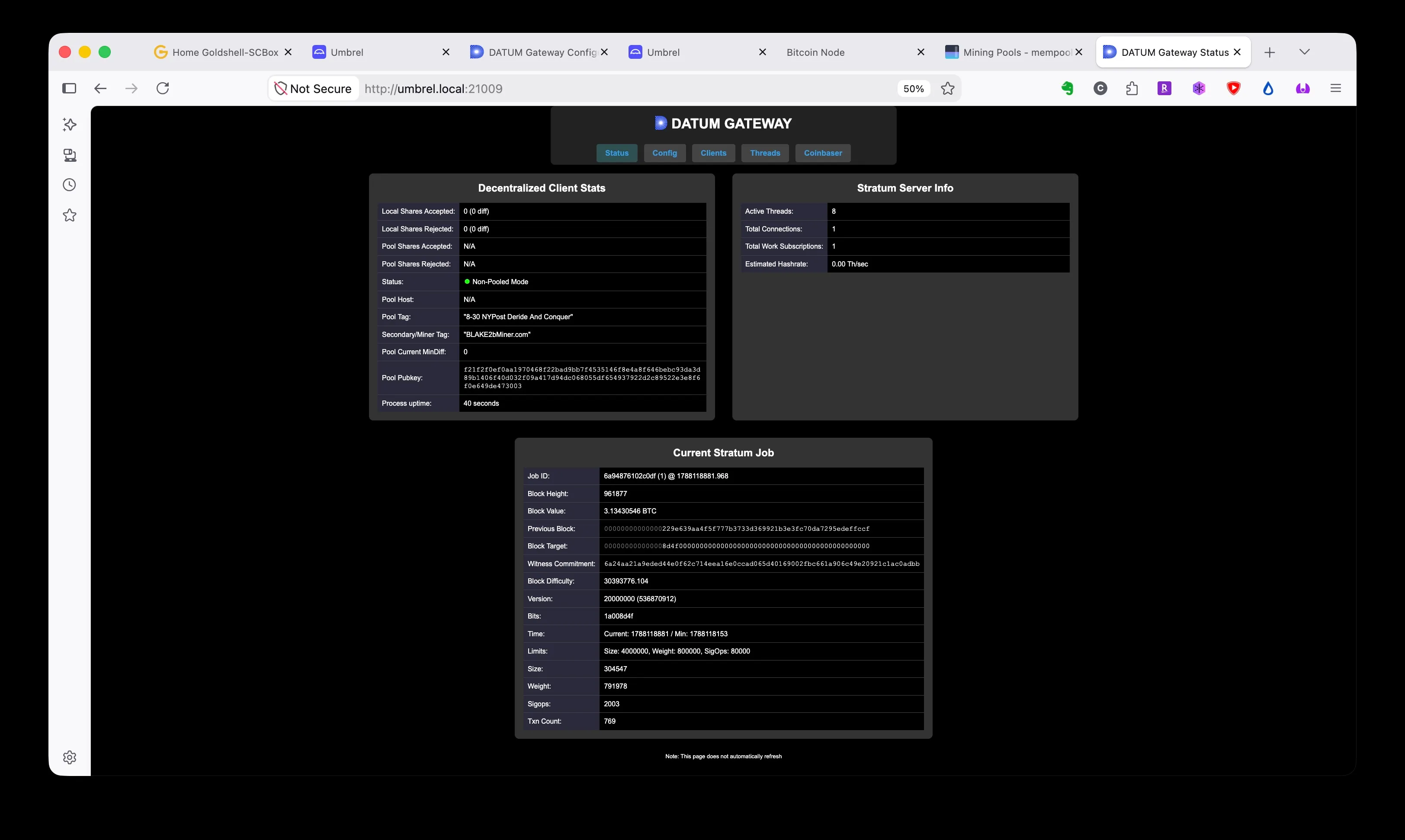
The whole afternoon in one screenshot: mainnet job template from our own node, correct tags, and the miner connected.
Our Goldshell found the restarted gateway on its own and subscribed for work; if yours does not, its pool settings just need to point back at the DATUM stratum host and port it was already using.
Update, 30 August, late evening. Luke Dashjr in the Knots Discord, a few hours after this post went up: the headline can come out of coinbase tags now. The code agrees: the check applies to exactly one block, the activation block 961,640, which is already mined. So the tags on new blocks are free text again, and the primary tag can carry your name instead of the headline. What still needs the headline: the blake2b_headline line in the Knots config, which rc4 refuses to start without and which a node syncing from scratch checks block 961,640 against, exact string and all. And if the rehearsal resets to an rc5, a new activation block will need a new headline. Everything above stands as the record of the day it was written.
Where that leaves things
As of this evening our node validates BLAKE2b mainnet on its own (the front page of this site now reads its heights from it), and the SC Box is grinding away solo. Solo, with one box, the honest expectation is that we find nothing and the address stays empty. That is fine. The point of this exercise was the node, the path, and the paper trail.
The unstable parts, stated plainly: rc4 is a rehearsal, not a final. The final release is due 1 September. If it ships clean, the chain that started at 961,640 continues and everything above stands. If something breaks, rc5 resets to 961,639, today’s blocks vanish, and part of this post gets a follow-up. Either way the PR merge, whenever it comes, makes the whole shortcut in Part 1 unnecessary, and the fake downgrade disappears with it.
The next post will cover whichever of those futures arrives.
One more thing, because this site runs on being checkable: we ran this procedure exactly once, today, on one box. If you run it and something is wrong, unclear, or has drifted out of date, say so, on X or in the Knots Discord, and this post gets fixed and dated. The first post on this blog already carries one correction a reader sent; this one can too.